

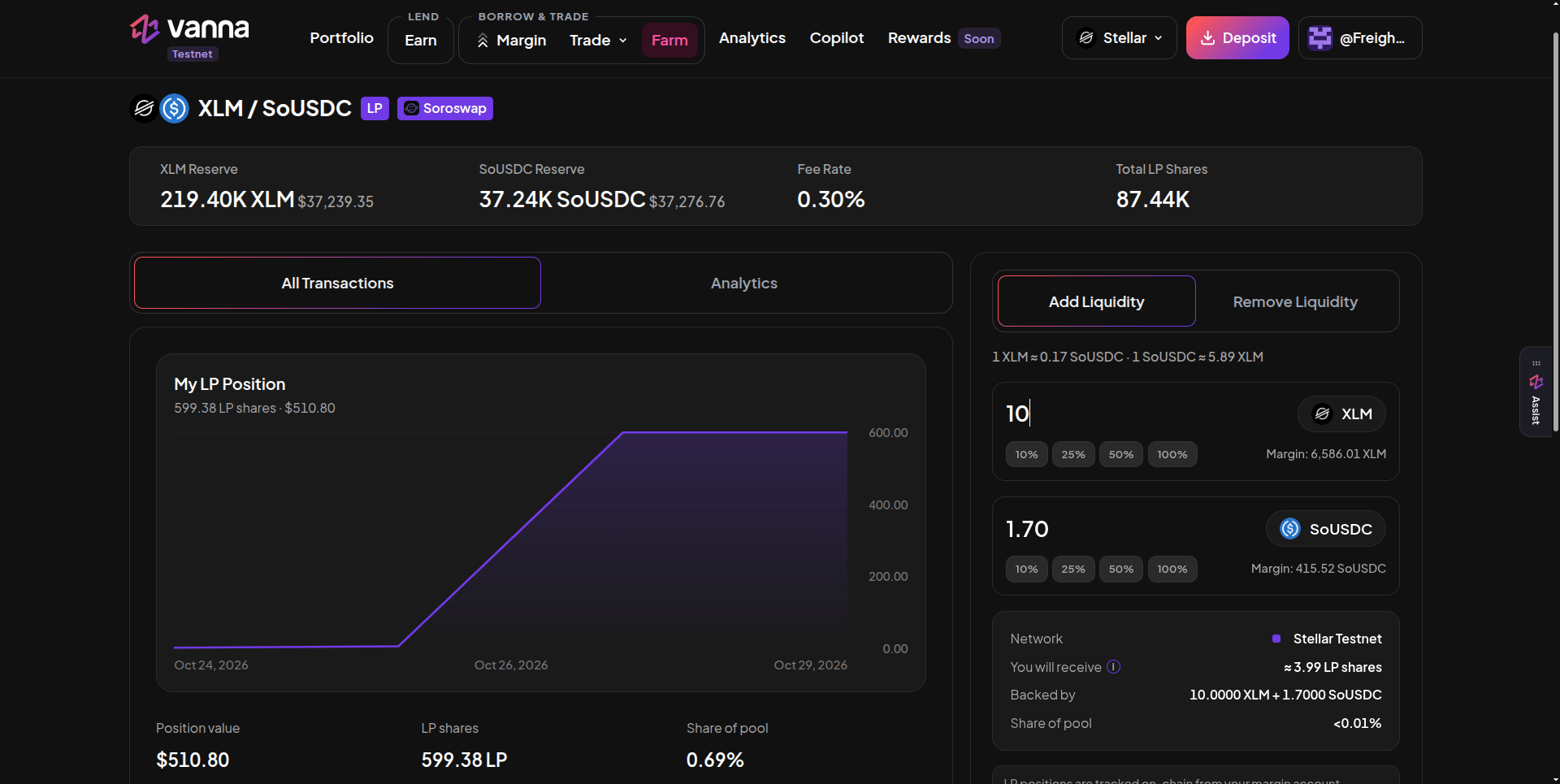
The Soroswap XLM / SoUSDC pool page: reserves, fee and total LP shares on top, your LP position on the left, Add Liquidity on the right. Click the image to zoom.
Add liquidity
1
Open the pool
On Farm → LP/Multiple Assets, click the pair.
2
Enter one side
On Add Liquidity, type an amount for either token. The other side fills in automatically from the pool’s live price (shown as “1 XLM ≈ … SoUSDC”). Margin under each field is what your account holds.
3
Check the summary
You will receive (estimated LP shares), Backed by (both amounts) and Share of pool.
4
Sign
Approve the transaction.
Remove liquidity
On Remove Liquidity, choose how many LP shares to burn (100% uses your exact balance) and sign. Both tokens return to your margin account. Removing liquidity doesn’t repay debt or send anything to your wallet.Good to know
- Collateral value is conservative. The Risk Engine values an LP position at twice the smaller side of its share of the reserves, which can be a little less than a DEX shows.
- Impermanent loss. If XLM moves against USDC, your LP holds more of the falling token. With borrowed funds, that loss hits your health factor.
- Liquidation. If the account is liquidated, LP shares are transferred to the liquidator as they are.