

Supported sign-in methods
Click Connect wallet at the top right. The Sign in to Vanna dialog lists:The dialog also lists Solana wallets. Picking one switches you to Vanna on Solana; Stellar positions stay with your Stellar address.
Connect
1
Prepare the wallet
Install Freighter, create or import an account, and switch its network to Testnet.
2
Open the sign-in dialog
Go to test.vanna.finance, enter your access code if asked, choose Stellar in the chain switcher at the top right, and click Connect wallet.
3
Approve the connection
Pick Freighter (or OneKey) and approve in the wallet pop-up. Your wallet name, for example @Freighter, replaces the button.
4
Check the address
Open the wallet menu to see your address. If you already have a margin account, Vanna finds it on-chain automatically.
Get test tokens
Click Deposit in the header. The Portfolio account modal opens on the Deposit tab: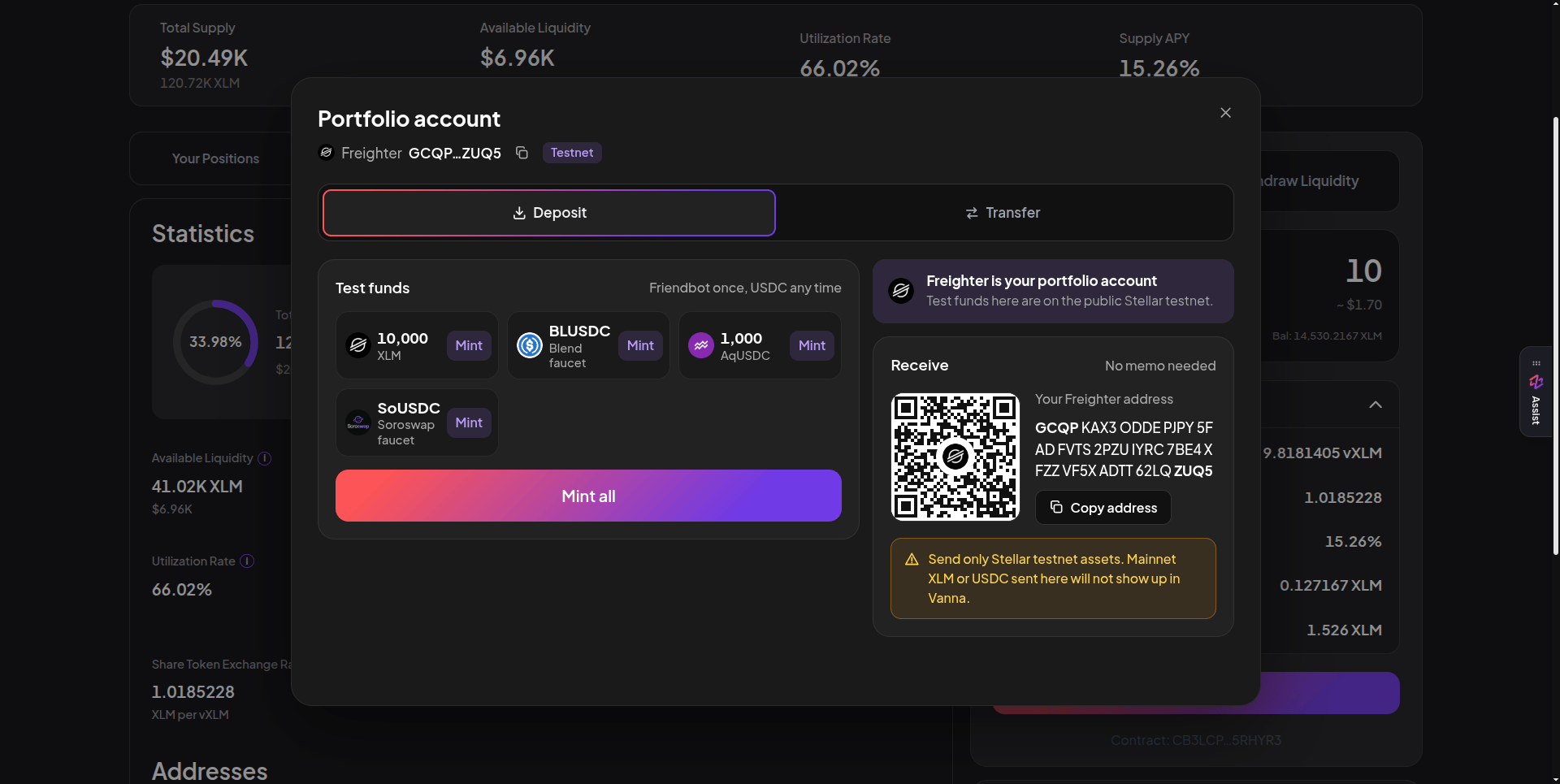
Test funds with one-click Mint per token and Mint all, plus your receive address and QR code. Click the image to zoom.
Mint all mints every token that isn’t already funded or cooling down. Some mints open your wallet once to add the token’s trustline; approve it. The Receive panel shows your address and QR code. Send only Stellar testnet assets there; mainnet XLM or USDC will not show up in Vanna.