

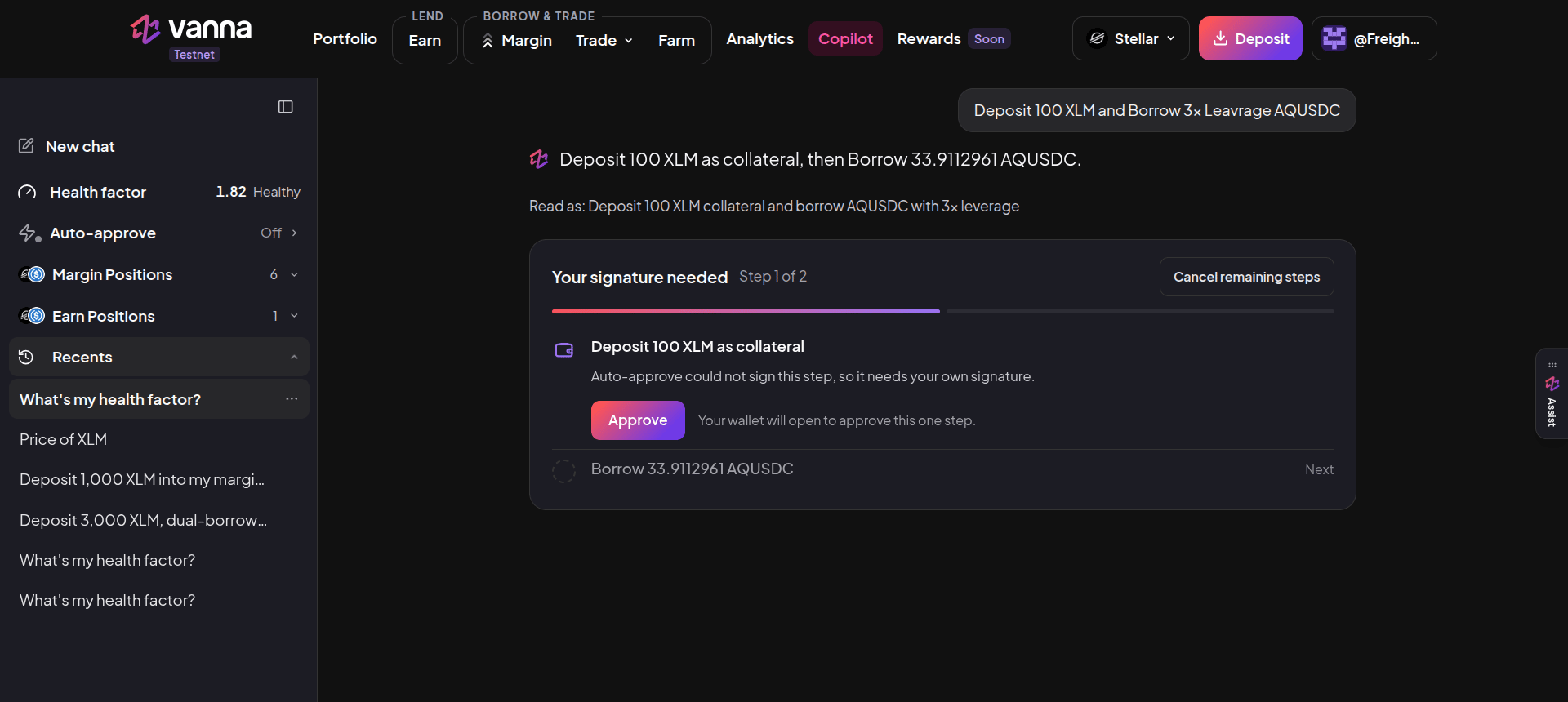
Copilot is an AI assistant that knows your Vanna account. Ask a question (“What’s my health factor?”, “Price of XLM”) or describe a change (“Deposit 100 XLM and borrow 3x leverage AqUSDC”), and it answers with live figures or prepares the transactions for your wallet to sign. It does what the rest of the app does, with the same rules and numbers. You just say what you want instead of filling in each page.
Copilot page with the request Deposit 100 XLM and Borrow 3x leverage AQUSDC, the plan Deposit 100 XLM as collateral then Borrow 33.9112961 AQUSDC, a Your signature needed card on step 1 of 2 with an Approve button, and a sidebar showing New chat, Health factor 1.82 Healthy, Auto-approve Off, Margin Positions 6, Earn Positions 1 and Recents

A two-step plan: deposit 100 XLM, then borrow AqUSDC at 3x. Step 1 is waiting for your signature. Click the image to zoom.

Get started

1

Open Copilot

Click Copilot in the header with your wallet connected.
2

Prove your wallet

With Freighter, sign a one-time message when asked. It is not a transaction and costs no fee. It lets Copilot read and act only for your own address.
3

Ask

Type in the box at the bottom and press Enter.

The sidebar

What it can do

Approving a plan

1

Review

Copilot restates your request (“Read as: …”) and lists each step with its exact amount.
2

Approve in time

A plan is valid for 5 minutes (the countdown starts at 4:59). After that it expires and you ask again, so it uses fresh prices.
3

Sign each step

Click Approve on a step; your wallet opens for that one transaction. Cancel remaining steps stops the plan; steps already confirmed stay done.
4

Check the result

A step shows as done only after the chain confirms it.
Every plan is checked against your health factor. Copilot pauses actions that would push the account toward liquidation.

Auto-approve

Auto-approve lets small, pre-approved steps go through without a confirmation click, within a per-transaction limit and a daily budget that you set and apply. It is off by default. With Freighter, every transaction still opens your wallet to sign; the plan card then says “Auto-approve could not sign this step, so it needs your own signature”.

Assist on every page

The Assist tab on the right edge of every page opens a lighter guide. It explains what you’re looking at (“What is a health factor?”, “How is Earn different from Farm?”) and hands you to Copilot when you want to act.