In Pro Mode you perform the same steps manually across the Margin and Farm sections. Lite Mode handles everything automatically.
Two tabs
Lite Mode has two tabs:- Deposit & Deploy - open new leveraged yield positions
- Position - view and manage your open positions
How to open a position
Select a yield pool
Choose the pool you want to deploy into. Each pool card shows its current Supply APR. The right panel shows live pool statistics - Supply APY, Borrow APY, Total TVL, and Utilization.

Deposit collateral
Enter the amount and asset you want to deposit as collateral. The interface shows your wallet balance and the USD equivalent in real time.

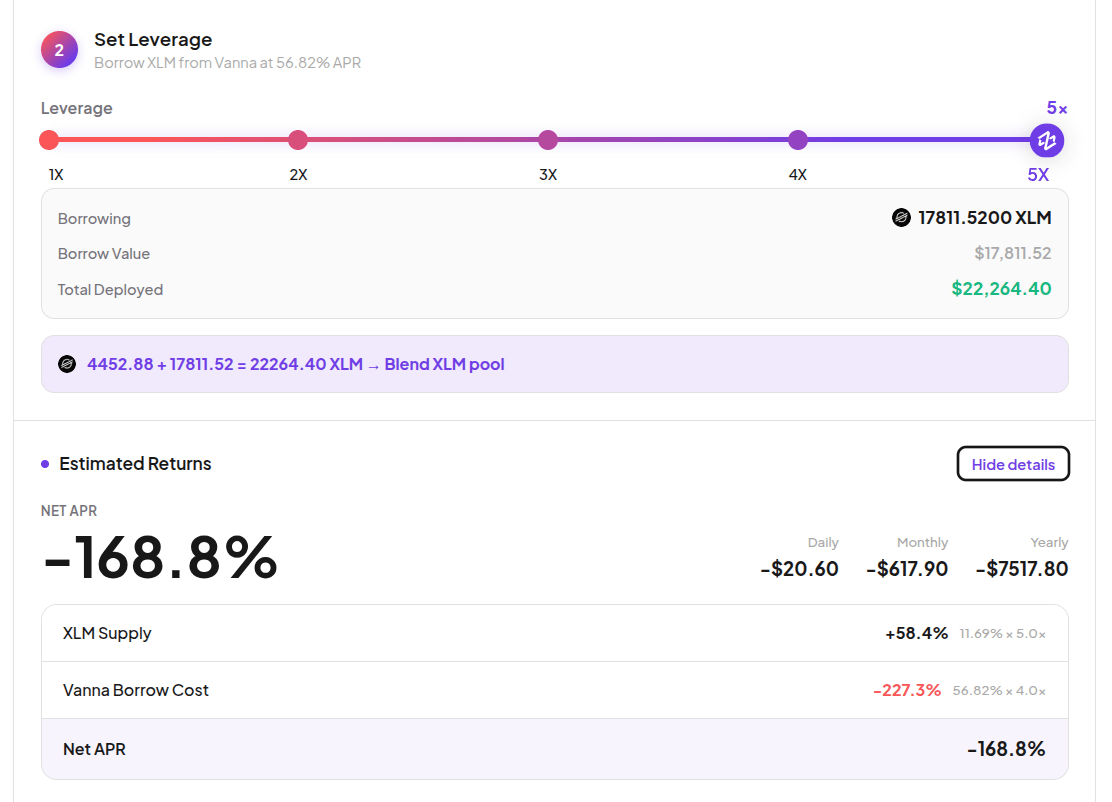
Set leverage
Use the leverage slider to set how much to borrow on top of your collateral. The interface shows exactly what will be borrowed, the total amount deployed, and the deployment route.At 1× leverage no borrowing occurs - only your deposited capital is deployed. The button shows Deposit Margin.At higher leverage, the interface shows the Estimated Returns section with:
- Net APR - your yield after borrow cost (daily, monthly, yearly)
- Full breakdown: Pool Supply APR × leverage minus Vanna Borrow Cost

Review position metrics
Before deploying, review the Position Overview metrics:
The How This Works section explains the exact flow - what gets deposited, what gets borrowed, and the final net result.

| Metric | What it means |
|---|---|
| Health Factor | Must stay above 1.1× to avoid liquidation. Aim for 1.5× or higher. |
| LTV | Debt as a percentage of your total assets. |
| Liq. Buffer | How much room you have before reaching the liquidation threshold. |
| Borrow Cost | The APR you pay for the borrowed capital. |
| Effective Leverage | Your actual leverage multiplier. |
Managing your position
Go to the Position tab to see all open positions. Each row shows Pool, Collateral, Borrowed, Net APR, Earnings to date, and Health Factor status.
- 🟢 Safe - HF ≥ 1.5
- 🟠 At Risk - HF between 1.1 and 1.5
- 🔴 Liquidation - HF below 1.1
Exiting a position
In the position detail view, choose how much to exit:- Partial exit (25% / 50% / 75%) - repays and withdraws proportionally. Health Factor stays unchanged.
- Full exit (100%) - closes all debt and returns all collateral in one transaction.